> For the complete documentation index, see [llms.txt](https://docs.siminsights.com/llms.txt). Markdown versions of documentation pages are available by appending `.md` to page URLs; this page is available as [Markdown](https://docs.siminsights.com/hyperskill-studio-authoring/state-machine-reference/actions/quiz.md).
# Quiz
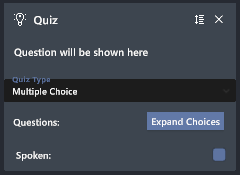
Quiz asks the user a multiple-choice question using the QMultiple action. A detailed explanation of controls and interface functions is described in the section [State Machine Builder User Interface](https://docs.google.com/document/d/1-o5qSv4zTkzj7YSmRTkV4zezFq7lwU00FyTy0kw1l1U/edit#bookmark=id.6vu41emx3478).
1. Within the edit Simulation section of the HyperSkill Desktop application, navigate to the State Machine tab.
2. Click on the desired state and, from the dropdown in either the entry or exit actions, select the type QMultiple.
3. Press the + button to add the action to the action list.
4. Press the Expand Choices button to type in your question prompt and its answers. To delete an answer, press the Trash button. In this menu you can also select which option is evaluated as correct.
5. Your QMultiple action updates to reflect your question prompt.
6. If you want the prompt to be spoken to the user, select the Spoken check box.